Tray and menu
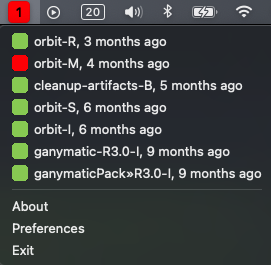
- Projects are grouped under
Failing,Building,PassingandUnknownheaders, each with a count, such asFailing (2). A section with no projects is left out. A failing project that is building again stays underFailing. With more than 15 projects, the passing ones move into aPassing (N)submenu, while failing and building projects stay in the menu itself. - Each project row has an icon for its last build status and how long ago it last built, such as
18m,11hor3d. A long name loses its middle, as inplatform » very-lo...nightly-e2e, 11h, so the job name and the time stay visible. Hover over it to see the whole name. - A project row shows the server's prefix in brackets when one is set, as in
[jenkins] platform » infra-deploy. A GitHub server without a prefix uses the repository name, as in[hello-world] CI (main), so two repositories with aCIworkflow stay apart. A cctray project whose name also appears on another server, and that has no prefix, gets the server's host in brackets. Notifications and the tooltip use the same label. Muting and change detection still go by server and project name, so a label that gains or loses its bracketed part doesn't unmute anything. - A project that is building shows a ring in its icon.
- Every project that isn't muted counts towards the overall status shown by the tray icon.
- The tray tooltip lists failing projects, such as
2 failing: api, web, with the server count, any pause (Notifications paused until 11:00) and the last checked time below it. When every server is down and none has projects from an earlier fetch, it saysCan't reach any serverinstead. - Click a project to open its page on the CI server.
- A server that can't be reached gets a row at the top of the menu with its menu prefix (or its host), a short reason and the time it happened, such as
jenkins: can't connect (10:00)orci.example.org: sign-in failed (10:00). The row opens a submenu with the full error, a hint when there is one,Retry now, which checks every server again, andEdit server..., which opens the server dialog. Its projects from the last successful fetch stay in the list. - The bottom of the menu has
Check now, which polls every server immediately instead of waiting for the polling interval, then the pause and mute items,Preferences...(Settings...on macOS),About BuildNotifyandQuit BuildNotify(Exiton Windows). The About box describes the app and links to the project page.
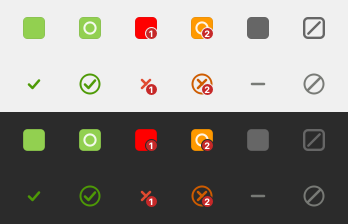
The tray icon shows the overall status: success, success while building (with a ring), failure, failure while building, no data (solid grey) and all servers down (hollow, slashed). When builds fail it also shows how many. The second row is the symbolic set.