GitHub Actions
BuildNotify can watch GitHub Actions without a cctray feed.
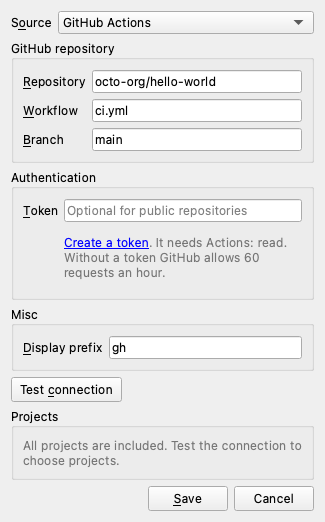
In the server dialog, set Source to GitHub Actions and fill in:
- Repository:
owner/name, such asocto-org/hello-world, or a pastedhttps://github.com/owner/nameURL. - Workflow (optional): a workflow file such as
ci.yml, or its name. Leave it empty for all workflows. - Branch (optional): leave it empty for all branches.
- Token: a personal access token that can read Actions on the repository. A fine-grained token needs the "Actions: read" permission. Public repositories work without a token, but GitHub then allows only 60 requests an hour. The token is kept in the system keyring.
Each workflow and branch pair shows as one project, such as CI (main). Its status comes from the last finished run: success is green, a failure, time-out or startup failure is red, and a cancelled or skipped run is unknown. While a run is queued or in progress the project shows as building, with the status of the run before it. Clicking a project opens the latest run on GitHub. Dynamic runs, such as Dependabot's updates, are ignored.
BuildNotify reads the 100 most recent runs on each poll, so a workflow that has not run within them drops off the list. With a workflow filter, it reads up to 4 older pages of 100 runs when the newest page has no finished run of that workflow. When GitHub reports that the rate limit is used up, every server that uses the same token is skipped until the limit resets, and the menu shows when it will try again. Servers without a token share one limit. A rejected token, missing access or an unknown repository shows as a short error on the server's menu row. Signing in through the browser (the OAuth device flow) is not supported yet.
Example
To watch the main branch of the CI workflow in octo-org/hello-world:
- Source:
GitHub Actions - Repository:
octo-org/hello-world - Workflow:
ci.yml - Branch:
main - Token: your personal access token
The project shows as CI (main).